
Save & Load xyzDiagrams
Why Save Diagrams?
Saving protects your modeling work, loading restores context, and JSON exchange keeps diagrams editable across devices and teammates. Use autosave for daily progress and deliberate exports for milestones.
Save and Load Strategy
Although xyzDiagram automatically stores your current work locally in the browser, exporting diagrams becomes useful when:
- Managing multiple diagrams
- Creating backups
- Sharing diagrams with others
- Moving work to another computer
- Creating different diagram versions
- Saving xyzDiagrams
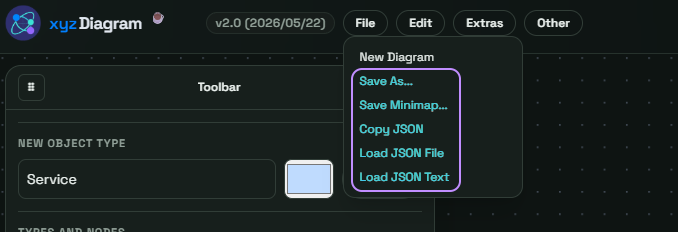
There are multiple ways to save your diagrams:
Format Reference
| Format | Best Use | Re-importable |
|---|---|---|
| PNG | Static slides and docs | No |
| SVG | Scalable visuals | No |
| Print-ready handouts | No | |
| JSON | Editable transfer and backup | Yes |
Keyboard Shortcuts
CTRL + S   Save/export
CTRL + O   Load JSON file
Menu Paths
File -> Save As...
File -> Save Minimap...
File -> Copy JSON...
File -> Load JSON File
File -> Load JSON Text
Additional Tips
The JSON format is the only format that can later be re-imported into xyzDiagram. This is useful for:
- Quick backups
- Sharing via chat or email
- Storing diagram snippets